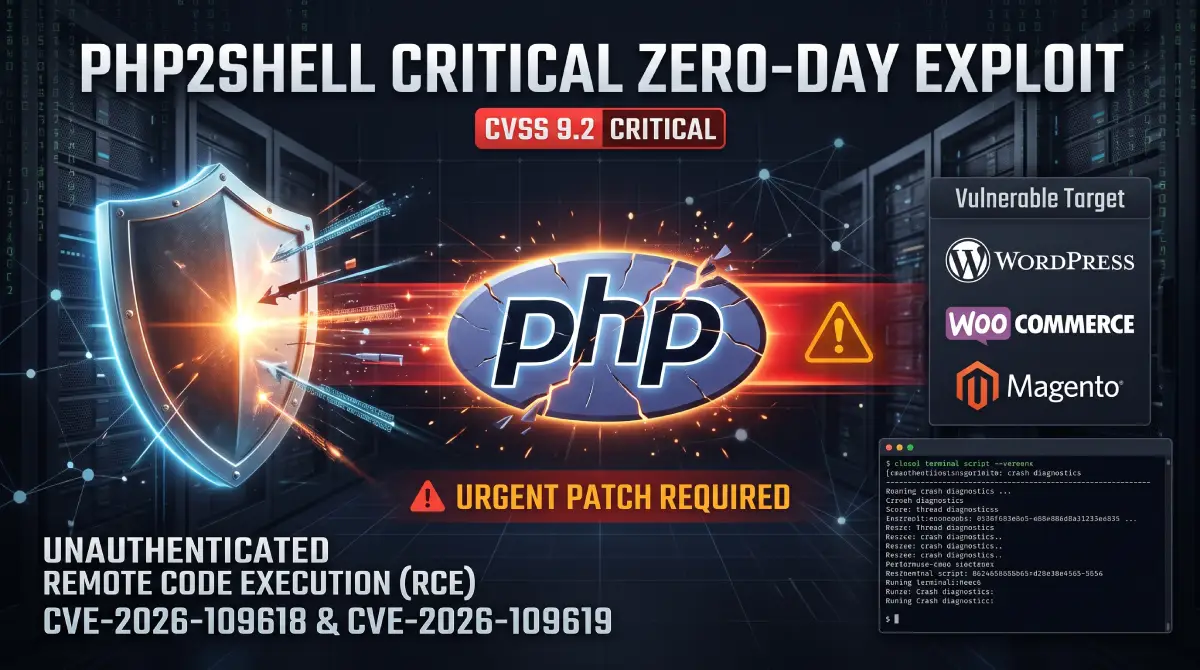
On October 21, 2026, the PHP Project, CERT-EU, and major cloud providers issued an emergency security advisory for two critical vulnerabilities tracked as CVE-2026-109618 and CVE-2026-109619—collectively dubbed PHP2Shell.
Rated 9.2 (Critical) on the CVSS v4.0 scale, these flaws affect every version of PHP from 5.4 through 8.5.11. They allow an unauthenticated attacker to execute remote commands (RCE) or leak sensitive server memory (database passwords, Stripe/PayPal API keys, and active session cookies) with a single HTTP request—before WordPress, WooCommerce, or any security plugin even loads.
If you host websites on an unmanaged VPS, VDS, or dedicated server (such as Contabo, DigitalOcean, Hetzner, AWS EC2, or Linode), your hosting provider cannot apply this update for you. Here is our complete technical case study, impact analysis, and step-by-step remediation guide.
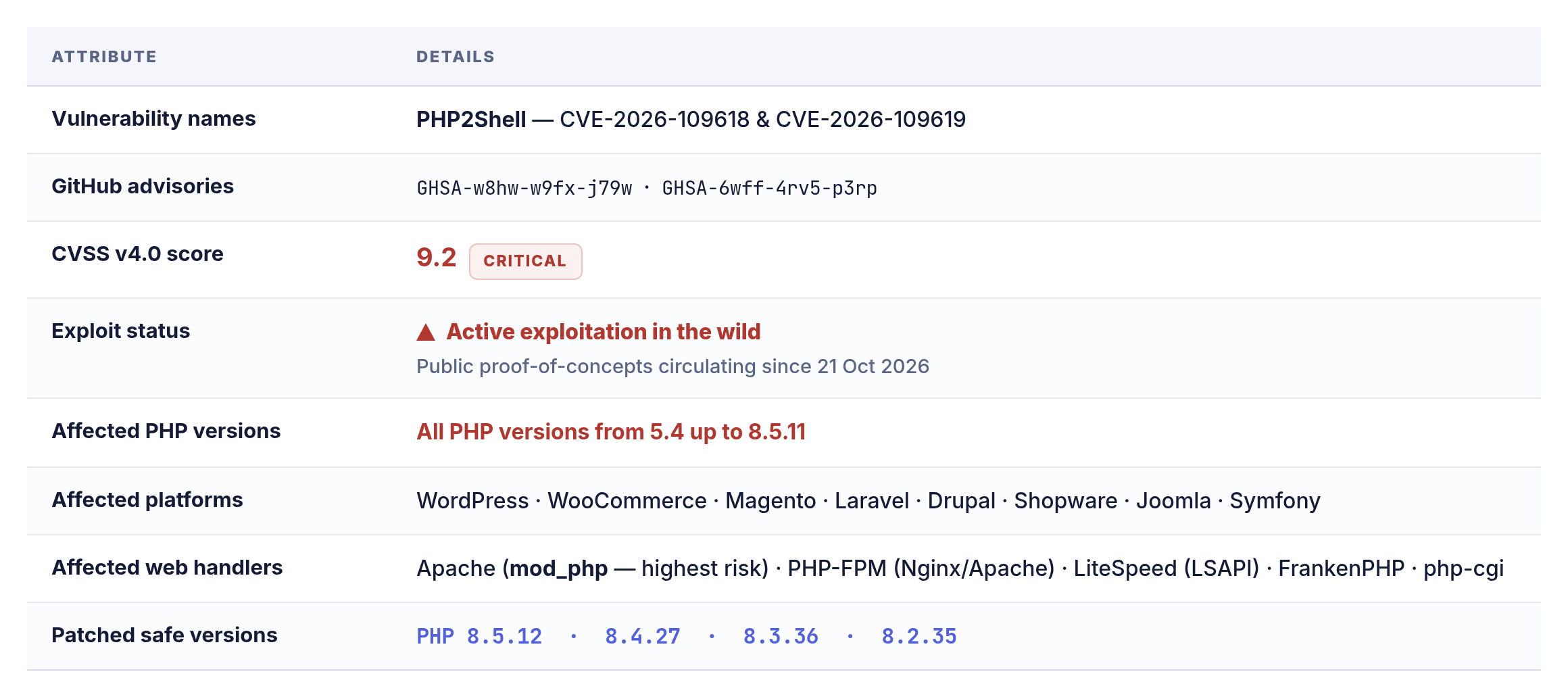
Executive Summary: PHP2Shell at a Glance
1. What Is PHP2Shell & How Does It Work?
Unlike typical CMS vulnerabilities caused by outdated plugins or themes, PHP2Shell lives inside the core C source code of the Zend Engine. Specifically, it exploits how PHP enforces memory limits (memory_limit) and cleans up fatal errors (longjmp()) while parsing incoming HTTP requests.
When your server receives a multipart/form-data request (the standard format used for file uploads and form submissions), the PHP engine parses those headers and initializes upload-progress tracking before handing execution over to index.php.
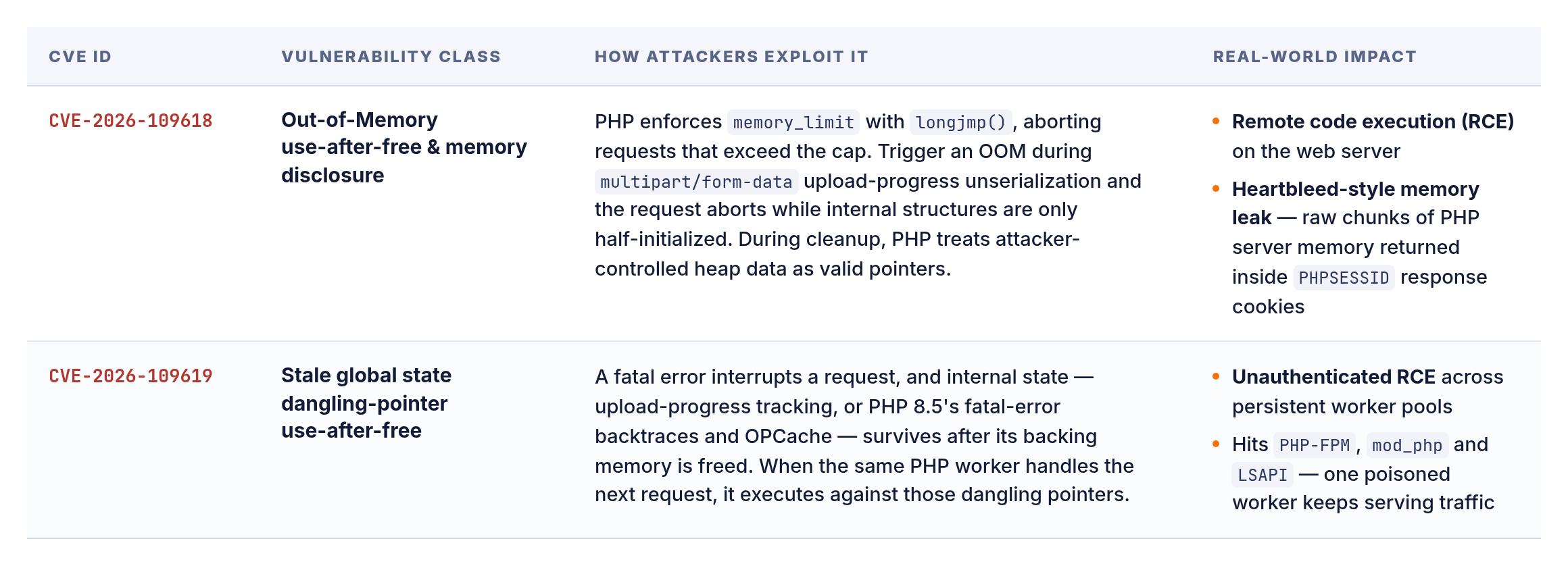
Technical Breakdown of the Two CVEs
Why WordPress Security Plugins & Firewalls Fail: Because PHP parses
multipart/form-datapayloads at the engine level prior to loading your PHP script, application-level security plugins (Wordfence, Solid Security, Sucuri plugin) and CMS maintenance modes are never reached.
2. How Did This Happen? Root Cause & Timeline
In an official post-mortem published on October 21, 2026, The PHP Foundation acknowledged that the underlying memory-handling flaw dates back more than a decade to PHP 5.4 (2012).
-
2012 (PHP 5.4 Era): The original
longjmp()error-handling and memory-limit assumptions are introduced into the Zend Engine. -
2024 (Quarkslab Security Audit): During an external audit commissioned by the Sovereign Tech Agency and OSTIF, a PHP Foundation developer spots the Out-of-Memory issue behind CVE-2026-109618, though no practical RCE exploit is known at the time.
-
2024–2026 (Consensus Deadlock): Redesigning OOM handling in C without breaking backward compatibility or C extensions proves extremely complex. The small PHP security team stalls over competing architectural approaches.
-
Late 2026 (AI-Assisted Weaponization): Security researchers at Wiz and watchTowr demonstrate that modern AI models can analyze the memory-safety bug, automate heap grooming, and achieve full unauthenticated RCE against default installations.
-
October 20, 2026 (Embargo Leak): Details of the embargoed vulnerabilities leak early. Major European organizations—including the Dutch House of Representatives, NCSC-NL, and Tweakers—take their PHP servers offline preemptively.
-
October 21, 2026 (Emergency Patches & Active Attacks): The PHP Project releases patched versions (
8.5.12,8.4.27,8.3.36,8.2.35). Within hours, automated scanners begin mass-exploiting unpatched servers globally.
3. Blast Radius: How Many Websites & Platforms Are Affected?
Because PHP powers over 75% of all websites whose server-side language is known, PHP2Shell carries a blast radius comparable to Log4Shell and Heartbleed.
-
Confirmed Vulnerable Applications: Security labs at Sansec, Wiz, and Mandiant confirmed unauthenticated RCE and memory leaks against WordPress, WooCommerce, Magento (including 2.4.9), Shopware, Laravel, Drupal, and Joomla.
-
The End-of-Life (EOL) Server Crisis: Threat intelligence indicates over 2 million publicly accessible servers still run PHP 7.4, with millions more on PHP 8.0 and 8.1. The PHP Project did not release binary updates for PHP 8.1 or older (providing only minimal source-code patches for building from source).
-
Silent E-Commerce Skimming & Key Theft: Unlike noisy defacements, CVE-2026-109618 allows attackers to silently siphon
wp-config.phpcredentials, Stripe/PayPal secret keys, and customer checkout data directly out of RAM via HTTP response headers without modifying a single file on disk.
4. Vulnerable vs. Patched PHP Versions Matrix
Check your server’s PHP version immediately against this reference table:
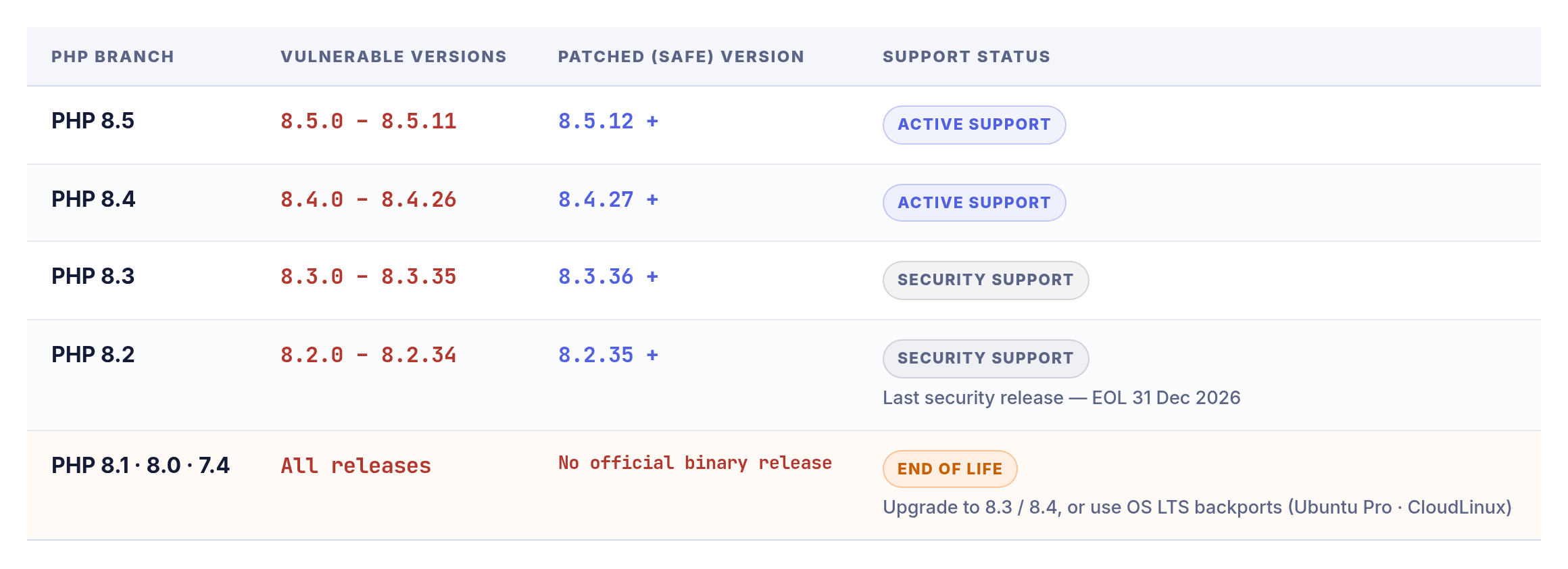
5. Step-by-Step Guide: How to Fix & Secure Your Server Now
CRITICAL WARNING: Before running package updates on your VPS or dedicated server, take a full Server Snapshot in your hosting control panel. Furthermore, updating PHP packages on Linux does not automatically reload running worker processes—you must restart PHP-FPM and your web server, or the old vulnerable code will keep running in RAM.
Step 1: Audit All Installed PHP Versions via SSH
Connect to your server via SSH and verify both the CLI version and all active web worker processes:
Bash
# 1. Check default PHP CLI version
php -v

# 2. Check all active PHP-FPM services and web server workers
systemctl list-units --type=service | grep php
ps aux | grep -E 'php-fpm|apache2|httpd|litespeed'
Step 2: Apply the Patch for Your Operating System or Panel
A. Ubuntu / Debian Linux (APT / Ondřej Surý PPA)
Bash
sudo apt update
sudo apt --only-upgrade install "php*" -y

# Restart all active PHP-FPM pools and web servers
sudo systemctl restart php8.4-fpm php8.3-fpm php8.2-fpm
sudo systemctl restart nginx apache2
B. AlmaLinux / Rocky Linux / RHEL (DNF)
Bash
sudo dnf clean all
sudo dnf update "php*" -y
sudo systemctl restart php-fpm httpd nginx
C. cPanel / WHM & Plesk Control Panels
-
cPanel / EasyApache 4: Run
/scripts/upcpas root via SSH (or update via WHM -> EasyApache 4), then restart PHP-FPM Service for Apache and HTTP Server (Apache). -
Plesk Obsidian: Navigate to Tools & Settings -> Updates -> Update Components, install the latest PHP builds, and restart PHP handlers.
Step 3: Emergency Workarounds (If You Cannot Upgrade Today)
If you manage a legacy site on PHP 7.4–8.1 or your Linux distribution hasn’t pushed the binary package yet, apply these three hardening measures immediately:
1. Lock Down Global php.ini Settings
Open your active php.ini file (e.g., /etc/php/8.3/fpm/php.ini) and add these directives globally (Note: Do not rely on .user.ini or ini_set(), as the exploit fires before per-directory overrides load):
Ini, TOML
; Disables the vulnerable upload-progress state handler (Mitigates CVE-2026-109619)
session.upload_progress.enabled = 0

; Required on PHP 8.5 only (Disables vulnerable fatal error backtrace state)
fatal_error_backtraces = 0

; Prevents the internal PHP OOM longjmp() trigger (Mitigates CVE-2026-109618)
; Use systemd/cgroups at the OS level to cap process RAM instead
memory_limit = -1
Restart PHP-FPM immediately after saving (sudo systemctl restart php*-fpm).
2. Enable Cloudflare WAF Proxy (Free & Paid Plans)
Cloudflare deployed emergency managed WAF rules targeting PHP2Shell exploit payloads across all tiers, including Free plans. Make sure your DNS records have the Orange Cloud (Proxied) turned on, and restrict ports 80/443 on your VPS firewall (UFW) to Cloudflare IP ranges so attackers cannot hit your origin server IP directly.
6. Post-Patch Forensic Checklist: Was Your Server Compromised?
Because automated scanning began on October 21, run these verification commands to ensure no backdoors were planted prior to patching:
Bash
# 1. Scan web directories for PHP files created or modified in the last 72 hours
find /var/www -type f -name "*.php" -mtime -3 -ls

# 2. Check Nginx/Apache access logs for upload-progress exploits or OOM 500/502 spikes
grep -E "PHP_SESSION_UPLOAD_PROGRESS| 500 | 502 " /var/log/nginx/*access*.log | tail -n 50

# 3. Inspect cron jobs and active memory-heavy processes for unauthorized scripts
crontab -l
sudo ls -la /etc/cron* /var/spool/cron/crontabs
ps aux --sort=-%mem | head -n 15
Pro Tip for WordPress & WooCommerce Owners: Because CVE-2026-109618 can leak memory contents passively without creating files on disk, if your server was unpatched between October 20 and October 22, regenerate your WordPress security salts in wp-config.php, rotate your database password, and roll your Stripe/PayPal API keys as a precaution.
7. Official Proof & Primary References
-
Official PHP Release Archive (Oct 21, 2026): php.net/archive/2026.php — Official patches for PHP 8.5.12, 8.4.27, 8.3.36, and 8.2.35.
-
The PHP Foundation Official Post-Mortem: Today’s PHP Security Release, and How We’re Strengthening PHP Security
-
GitHub Advisory Database (PHP Source):
GHSA-w8hw-w9fx-j79w(CVE-2026-109618) &GHSA-6wmf-4rv5-p3rp(CVE-2026-109619). -
CERT-EU Security Advisory 2026-018: Critical Vulnerabilities in PHP
-
Google Cloud & Mandiant Threat Intelligence: Responding to core PHP vulnerabilities CVE-2026-109618 and CVE-2026-109619
-
Sansec E-Commerce Threat Research: PHP2Shell: Critical PHP RCE & Memory Leak Analysis